Your Mobile Support

  • Subscribe to our RSS feed.
  • Twitter
  • StumbleUpon
  • Reddit
  • Facebook
  • Digg
Showing posts with label Latitude. Show all posts

Thursday, 7 April 2011

Check in, gain status, and unlock offers at more places with Google Latitude

Posted on 16:35 by Unknown
Last month, we rolled out Google Latitude check-in offers for 60 places around Austin. Today, we’re happy to announce that we’ve teamed up with some great partners to let you unlock check-in offers at thousands of places across the U.S. using Latitude for Android and iPhone. You can learn more at google.com/latitude/checkin.

Checking in lets you share the places that you visit and add context to your Latitude location for friends and family. At the same time, you can keep a history of where you’ve been while gaining status at the places you visit the most. When you gain status at places, they can now reward your loyalty with check-in offers. From discounts to a free snack, check-in offers let places give you an extra reason to keep coming back. Here’s how to get started:
  1. Check in. Check in using Latitude to share places with friends when you’re there.
  2. Gain status. Keep checking in every time you visit your favorite places to gain status there. You can tap your current status level to see your progress towards the next status level.
  3. Unlock offers. Places can make check-in offers available to you at each of their 3 status levels. When you gain higher status, you’ll unlock any available check-in offers.


From a Place page, check in, see your current status, and find check-in offers (left); tap your current status to see your progress to the next level (right).

You’ll be able to see both available and locked offers at places. To redeem an available check-in offer, just select it from the Place page, tap Redeem, and show the full offer on your phone.

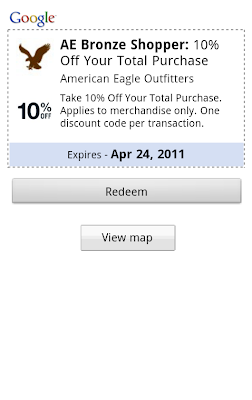
See available and locked offers (left); tap available ones to redeem them (right).

By default, you can become a Regular, VIP, or Guru at places, but we’re also letting partners create their own status levels for you to achieve (coming soon on iPhone). For example, you can become a Champion of Taste at Quiznos or an AE Gold Shopper at American Eagle Outfitters, unlocking their check-in offers at the same time. Take a peek at some of our partners and their check-in offers below or see all of them at google.com/latitude/checkin.
  • American Eagle Outfitters: Up to 20% off your total purchase
  • Quiznos: Free sub when you buy a sub of equal or greater value
  • Arby’s: Free regular roast beef sandwich with purchase of a 22 oz. drink
  • RadioShack: Up to 20% off qualifying, in-store purchases
  • Finish Line: Save $10 on purchases over $50
  • Macy’s (Coming soon)
To start unlocking offers with Latitude, update to the latest version of Google Maps for Android (Latitude is a feature of Maps; requires Android 1.6+) or the Latitude app for iPhone. So start checking in at places when you’re there, and you might just unlock some great offers along the way.

Posted by Douglas Gresham, Software Engineer, Google Maps for mobile team
Read More
Posted in check-in, Latitude | No comments

Monday, 4 April 2011

See your location history dashboard and more with Google Maps 5.3 for Android

Posted on 12:45 by Unknown
[Cross-posted from the Google Mobile Blog]

Today, we’re happy to announce Google Maps 5.3 for Android, which lets you see your Google Location History dashboard, check in at “home,” and add your own aspects for places when rating them.

Location History dashboard
If you’ve enabled Location History for Google Latitude, you’ve been able to visualize interesting trends in your location history with a personal dashboard at google.com/latitude on your computer. Now, you can also see your dashboard on your phone by tapping View location history from your Latitude profile. You’ll be able to see right on your phone how far you’ve travelled as well as an estimate of how much time you’ve spent at home, at work, or out.

If you haven’t yet, you can enable Location History from your computer or from Latitude’s Settings menu on your phone. Location History is 100% opt-in and is private to you and nobody else. You can always delete any of your location history from the Manage History tab or correct the estimated work and home locations from the dashboard on your computer.

View your location history dashboard from your Latitude profile on your phone and see estimates of where you’ve spent your time.

Check in at home
Now that you can see how much time you spend at “home”, you might want to let friends know when you’re there. Checking in at places using Latitude is another way to keep a history of places you’ve been and also lets you share when you’re there. I love letting friends and family know when I’m at a cafe or park, but sometimes I want them to know that I’m relaxing at home or made it back safely from a road trip. So now, I can start checking in at “home” in Latitude:
  1. Check in from Latitude and tap “Home - Tap to set your location” at the bottom of the nearby places list if you don’t have one yet.
  2. Use the estimated current address or enter in your home address yourself.
  3. Once you’ve checked in at home once, “Home” will appear at the top of the list when you’re checking in near there.
Like Latitude and other check-ins, checking in at home is entirely opt-in. Your set “home” location is not searchable and only you can check in there. Just like any other check-in, you can choose with whom to share your home check-ins (along with your name and address info).

Add your own aspects for places
When you’re rating places on the go in Maps using Google Places with Hotpot, you could always quickly leave feedback on a specific aspect or characteristic of a place, such as the food or ambiance. Before, we’d automatically include aspects about places that were commonly mentioned in reviews. Now, you can add your own aspects for each place. So if you think a place has a beautiful view or great music, you can add it yourself and quickly share it with the world.

When rating places, you can add your own aspects like “music” for places and leave quick feedback.

To get started, update Google Maps from Android Market on devices with Android OS 1.6+ anywhere Google Maps and Latitude are already available.

Posted by Kenneth Leftin, Software Engineer, Google Maps for mobile team
Read More
Posted in Hotpot, Latitude, Mobile | No comments

Thursday, 10 March 2011

Check in, gain status, and unlock offers with Google Latitude in Austin

Posted on 13:00 by Unknown

Do you have a go-to restaurant you love – a place where everybody knows your name? If you’ve been checking in there from Google Latitude in Google Maps for Android, we want to help you get a little extra love right back. After launching check-ins for Latitude last month, today we’re rolling out our first check-in offers at more than 60 great places in Austin, Texas.

Checking in from Google Latitude lets you easily share the places you go with friends, and you can even choose to get check-in notifications or automatically check in to make it even easier. In addition to sharing places, you can also gain status as a “Regular”, “VIP”, or “Guru” at places depending on how often you’ve checked in there. You can even see your progress along the way by tapping your current status. I’ve been checking in almost everywhere I go, and after a steady stream of caffeination at my favorite coffee shop, I’m proud to be a Guru there!


From the Place page, find available check-in offers (left); tap your status to see where you stand and find your check-in history (right).

In addition to pride, you can now unlock check-in offers that places have created for your status level. So, a restaurant or shop can give their Regulars a reason to keep coming back and their Gurus an awesome reward for their loyalty. Check-in offers can be as creative as places want for any of the three status levels. You can find places where check-in offers are available in Google Maps for Android search results and Place pages.

See if a place has check-in offers available in your Google Maps for Android search results.

You’ll be able to see both available and locked check-in offers. And once you gain status and unlock a check-in offer, just tap Redeem and show your phone to use it. Learn more at google.com/mobile/checkin.

See locked offers and ones available at your status level (left); tap an unlocked one and redeem it (right).

We’re kicking off check-in offers in Austin this week, and we’re working on bringing them to more people and more places. If you’re in town for South by Southwest this week or just happen to live near Austin, find check-in offers at some of its finest establishments, such as:
  • Free coffee for Regulars at Frank
  • Free sundae from the cafe for VIPs at Toy Joy
  • Buy a slice and get one free during certain hours for VIPs at East Side Pies
  • 10% off any upcoming event book for Gurus at BookPeople
  • 20% off select merchandise for Gurus at Waterloo Records
Find all the check-in offer locations in Austin on a map, and then see more details by opening their Place pages in Google Maps for Android.

To get started unlocking offers, update to Google Maps 5.2 in Android Market (requires Android 1.6+) and tap Check in here from a Place page or from Latitude’s menu. If you haven’t yet, join Latitude and check in wherever you go. And if you’ve got an iPhone, the Latitude app for iPhone will be updated with check-ins and check-in offers soon.

Posted by Kenny Stoltz, Product Manager, Google Maps Team
Read More
Posted in Latitude, Mobile | No comments

Friday, 4 February 2011

Geotagging photos with Panoramio and Google Latitude

Posted on 07:45 by Unknown
[Cross-posted from the Panoramio Blog]


It is 9 a.m. and the thermometer shows -15°C. I have a Nexus S with Google Latitude in my left pocket and my new Lumix LX-5 in the right one. I am in Davos and I am ready for a fantastic day of skiing when I decide to use the new feature of Panoramio: geotagging photos with Google Latitude.


Panoramio is a community photos website that enables digital photographers to geo-locate, store and organize their photographs -- and to view those photographs in Google Earth.


Google Latitude allows you to share your location with friends and view their location on a map. When enabled, Google Latitude History allows you to store your previous locations and this allows you to match your photos with the locations stored in Google Latitude History.


By combining Panoramio and Google Latitude your photos get geotagged automatically as the time stamp of the photos is matched with your location record in Google Latitude History. To use this feature you need to explicitly enable it in your Settings page in Panoramio. With your permission, Panoramio will access your Google Latitude History to find out your location at the time when your photos are taken, so make sure the time in your camera is correct and it matches the value you entered in the Panoramio Settings page.


Using Google Latitude while skiing allows you to find your friends when you get lost on the slopes, and at the same time it allows you to focus on taking nice photos not worrying about the location where you are taking them.


Mapping photos within the city is normally not a problem as you can easily remember street names, points of interest, etc. It is much more difficult to do it in the countryside and that is why I decided to give the feature a whirl while skiing in Davos:


Thanks to Google Latitude, my photos were geotagged just after uploading them in Panoramio. The day was great, snow was perfect, weather was amazing and when I arrived home my photos were already geo-positioned.


For more information about this feature please check our help content and as always we will be happy to hear your feedback in the Panoramio forum.


Posted by Gerard Sanz, Panoramio Community Manager
Read More
Posted in education, Google Earth, Latitude, Panoramio, photos | No comments
Older Posts Home
Subscribe to: Posts (Atom)

Popular Posts

  • Help improve the “blue dot” for people visiting your venue
    When we announced the availability of indoor maps for Android last November , we also introduced Google Maps Floor Plans as a tool for busi...
  • Take off for the holidays with Google Street View
    Whether it’s touring the canals of Venice , swimming with the seals in the Galapagos or climbing the Burj Khalifa in Dubai, Street View ha...
  • Imagery Update - Week of May 16th
    The Google Earth and Google Maps Imagery Team has just published its latest batch of satellite and aerial imagery, and as always, there ar...
  • Welcome to the world’s largest intact forest: Canada’s boreal
    Editor’s Note: Today's guest author is Steve Kallick, from the Pew Environment Group’s International Boreal Conservation Campaign. We ar...
  • Why maps matter: Using digital cartography tools to change the world
    People have created maps since early civilization, but only recently have digital mapping tools like Google Earth and Maps made it easy to...
  • Imagery Update: Week of August 29th
    The Google Earth and Google Maps Imagery Team has published their latest batch of aerial and satellite imagery! In this blog post, we’d li...
  • Imagery Update - Week of May 31st
    The Google Earth and Google Maps Imagery Team has just published its first batch of satellite and aerial imagery for June, and as always, ...
  • Imagery Update: Week of February 20th
    The Google Earth and Maps Imagery team recently published another batch of satellite imagery. In this post, we’ll explore a few well-known...
  • Traffic and Transit Come to Google Maps in Malaysia
    We originally launched Google Maps in Malaysia back in 2009, and since then, Malaysians have been avid users of the service on both their d...
  • Google Maps Roundup for September: Making Google Maps even better for you
    As always, we’re focused on making Google Maps the best it can be for people around the world. In September, we added many new features to G...

Categories

  • #treasuremap
  • +1
  • 3D
  • 8bitmaps
  • Adwords Express
  • Africa
  • Amazon
  • Andorra
  • Android
  • api
  • Art Project
  • Audi
  • biking
  • Boost
  • Boulder
  • Brazil
  • Bulgaria
  • Business Photos
  • Canada
  • check-in
  • community
  • competition
  • contest
  • crisis response
  • Culture
  • custom maps
  • developer
  • Developers
  • directions
  • disaster response
  • discovery
  • Download Free Nokia 6680 PC Suite
  • Download Micromax pc suite
  • Download Micromax pc suite for window
  • Download micromax Q5 Pc suite
  • Download PC suite
  • Download Samsung Mobile Pc Suite
  • earth outreach
  • education
  • Enterprise
  • Estonia
  • Europe
  • Fusion Tables
  • galaxy s2
  • Gibraltar
  • GMM
  • google
  • Google Earth
  • Google Earth Engine
  • Google Map Maker
  • Google Maps
  • Google Maps API
  • Google Maps Engine
  • Google Maps for Mobile
  • Google Maps Navigation
  • Google Maps Transit
  • Google Places
  • Google Plus
  • Google Search
  • Google Street View
  • google.org
  • Google+
  • googlenew
  • Grand Canyon
  • ground truth
  • Halloween
  • historical
  • history
  • Hotpot
  • HTC PC Suite Download
  • HTC PC suite for WIN 7
  • HTC PC Suite Free Download
  • HTC sync Downlaod
  • HTC Sync Download for windows
  • HTC Sync Free Download
  • Hungary
  • imager
  • imagery
  • Indoor Maps
  • iPhone
  • Iraq
  • Japan
  • Latitude
  • Latvia
  • layers
  • LG Mobile PC Suite
  • LG Mobile Support Tool
  • LG PC suite Download
  • Lithuania
  • London
  • Malaysia
  • Mall of America
  • Map Maker
  • mapsgl
  • Matt Harding
  • Mexico
  • Micromax A110
  • Micromax Canvas 2
  • Micromax pc suite download
  • Micromax PC suite for windows
  • Micromax Q5 FB PC Suite Free Download
  • Micromax Q5 FB PC Suite Free Download For Windows
  • Mircromax Q3 PC Suite Download for windows
  • Mobile
  • Monticello
  • My Maps
  • my places
  • my tracks
  • navigation
  • new Google Maps
  • Nokia 5250 PC Suite Free Download
  • Nokia 5530 PC Suite Free Download
  • Nokia 5610 PC Suite Free Download
  • Nokia 5800 PC Suite Free Download
  • Nokia 6030 PC Suite Free Download
  • Nokia 6680 PC Suite Download for windows
  • Nokia 6680 PC suite free Download
  • Nokia Asha 305
  • Nokia Asha 306 PC Suite download
  • Nokia C3-01
  • Nokia Free Suite
  • Nokia Mobile PC suite Download
  • oblique imagery
  • ocean
  • offline maps
  • Outreach
  • Pakistan
  • Panoramio
  • Parks Canada
  • Pegman
  • photo tours
  • photos
  • picasa
  • Quiz
  • real estate
  • Russia
  • Samsung C3322 PC Suite Free Download
  • Samsung C6712 PC Suite Free Download
  • Samsung Corby 2 PC Suite Free Download
  • Samsung Galaxy
  • Samsung Galaxy 5830 PC Suite Download
  • Samsung Galaxy Ace Hugo Boss
  • Samsung Galaxy Ace PC Suite Download
  • Samsung galaxy I8190 S III PC Suite Download
  • samsung galaxy mega
  • Samsung Galaxy Mega 5.8
  • Samsung Galaxy Mega 6.3
  • samsung galaxy s2
  • Samsung Galaxy Stratosphere II I415
  • samsung GT-I9100 pc suite
  • Samsung GT-S6102 Galaxy Y Duos PC Suite Download
  • Samsung GT-S6102 PC Suite Download
  • Samsung I9000 Galaxy S PC Suite Download
  • Samsung mobile pc suite downlaod
  • samsung mobile pc suite download for Windows 7 ad XP
  • samsung mobile pc suite download for Windows 7 and XP
  • Samsung N7100
  • Samsung Note 2
  • Samsung Note II
  • Samsung PC Suite Download.
  • Samsung Wave Y Drivers Download
  • Samsung Wave Y PC Suite Free Download
  • Santa
  • Santa Tracker
  • search stories
  • SketchUp
  • Slovakia
  • Slovenia
  • Sony PC Companion Free Download
  • Sony PC Suite Free Download
  • South Sudan
  • space
  • Spain
  • sports
  • Street View
  • Sumsang C3322 Drivers Download
  • SXSW
  • Tags
  • Thomas Jefferson
  • Thomas Jefferson Foundation
  • Tip of the week
  • tour guide
  • traffic
  • Train
  • Transit
  • trees
  • Trekker
  • U.S. National Park Service
  • Ukraine
  • University of Virginia
  • voice search
  • walking
  • Waze
  • weather
  • webgl
  • Xperia PC Suite Download
  • zagat

Blog Archive

  • ▼  2013 (87)
    • ▼  November (7)
      • Take off for the holidays with Google Street View
      • Take a hike with Street View through U.S. National...
      • Street View floats into Venice
      • Mapping the world’s deforestation over time
      • Meet nonprofits using “Geo for Good”
      • Tour Builder: Tell your stories with Google Earth
      • From where you are to where you want to go
    • ►  October (3)
    • ►  September (4)
    • ►  August (9)
    • ►  July (13)
    • ►  June (12)
    • ►  May (10)
    • ►  April (9)
    • ►  March (11)
    • ►  February (2)
    • ►  January (7)
  • ►  2012 (192)
    • ►  December (9)
    • ►  November (5)
    • ►  October (24)
    • ►  September (13)
    • ►  August (15)
    • ►  July (18)
    • ►  June (21)
    • ►  May (17)
    • ►  April (19)
    • ►  March (26)
    • ►  February (12)
    • ►  January (13)
  • ►  2011 (234)
    • ►  December (13)
    • ►  November (17)
    • ►  October (19)
    • ►  September (15)
    • ►  August (23)
    • ►  July (25)
    • ►  June (20)
    • ►  May (20)
    • ►  April (23)
    • ►  March (24)
    • ►  February (18)
    • ►  January (17)
  • ►  2010 (21)
    • ►  December (21)
Powered by Blogger.

About Me

Unknown
View my complete profile